
- Download is just the installer. The zip of setup-plus-app is gone, and so is the preflight launcher in front of it. You download a 7.6 MB
Moon-Executor-1.3.2-setup-win-x64.exeand nothing else. - Setup fetches the app itself. It reads the payload zip from the release that matches its own version, checks the SHA-256 digest GitHub publishes for the asset, unpacks to a temp folder and installs from there. A torn or swapped download never reaches disk.
- Updates reuse the same files. The app's forced update downloads the payload zip plus the setup exe, then hands the zip to setup with
--payload, so an update never downloads the app twice. - One release, two assets.
Moon-Executor-1.3.2-setup-win-x64.exeandMoon-1.3.2-payload-win-x64.zip. Setup defaults to the version it was built with; the welcome screen shows the size it is about to download. - 1.3.1 can still update into this. The release also carries the old single-zip bundle for one version, so installs whose updater predates the split install 1.3.2 instead of stalling at the gate.
- The API file is Moon-branded.
MoonExecutorAPI.dllnow carries its own name in its version resource — company, product and description — instead of the upstream vendor's. Same code, same assembly identity, renamed file info. - One file to install. The Moon API, WPF-UI, AvalonEdit and the rest are packed into
MoonExecutor.exeitself, so an install is that exe plus the API'sbin\folder — the loader, the module and the Roblox binary have to stay on disk for Roblox to find them.
Windows 10 & 11 · x64 · Moon API
A quiet place
to run Luau.
Moon Executor is a Windows 11 native front-end for the Moon API. Write in tabs, run across every attached client, and read everything Roblox prints in a terminal that never drops a line.
Free & keyless through the public beta
01
Every client, one shortcut
F5 or Ctrl+Enter runs the active tab on all attached Roblox processes at once. Auto-attach keeps new ones in the fold.
02
Terminal, not log viewer
Level tags, source filters, timestamps, save-to-file and a prompt that can run a line of Luau. Nothing is trimmed.
03
The assistant can drive
A loopback MCP server exposes attach, execute, script and log tools to any MCP-capable model. Token required.
04
Ships as a normal app
Per-user install, Start menu entry, Add/Remove Programs, silent switches and a clean uninstall that can keep your settings.
01 Editor
Write once.
Run everywhere.
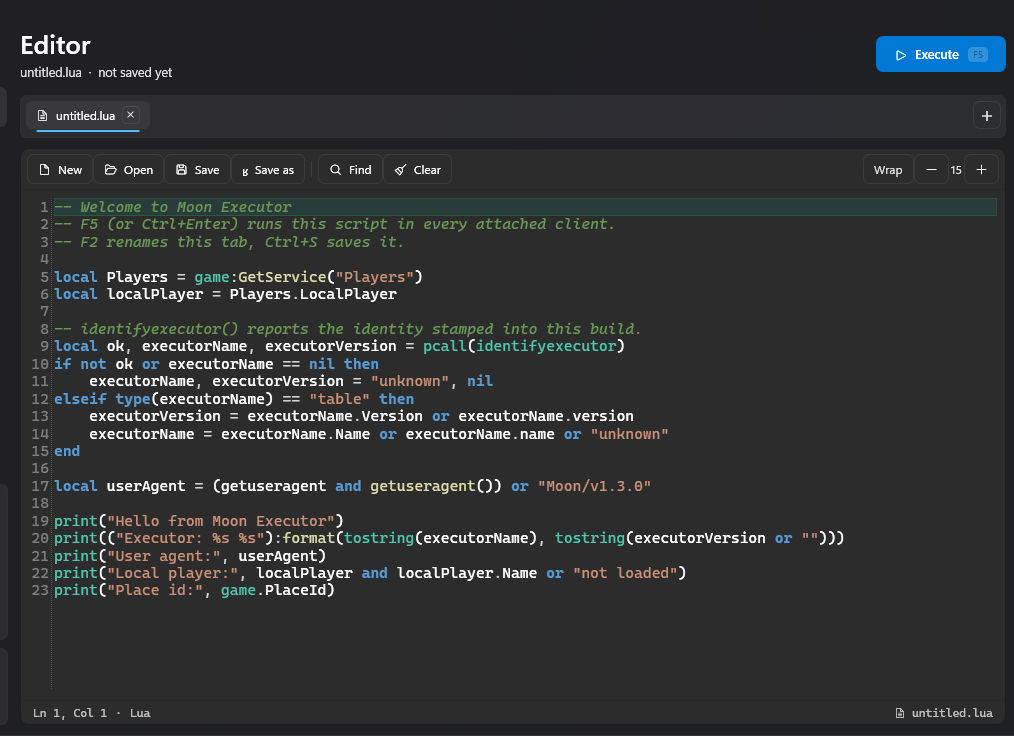
An AvalonEdit surface with real tab behaviour: per-tab dirty state, rename on F2, search with Ctrl+F, and a run key that fires the code at every injected client.
-
Tabs that remember
Dots mark unsaved work, Ctrl+W closes, and the whole session comes back on the next launch.
-
One key, all clients
F5 and Ctrl+Enter run against every attached process. The result comes back per client, not once for all.
-
Find inside the file
A slide-down find bar, match counts and Enter to step. Ctrl+F opens it without leaving the code.
-
Files where you put them
Open, save, Save as, Clear — plus scripts, workspace and autoexec folders one click away in the rail.
Shortcuts
F5run all
CtrlEnterrun all
CtrlSsave
F2rename
CtrlFfind
CtrlWclose tab
hello-moon.lua
Luau
-- Identify the executor, then talk to the game.
local Players = game:GetService("Players")
local localPlayer = Players.LocalPlayer

local ok, executorName, executorVersion =
    pcall(identifyexecutor)

print("Executor:", executorName, executorVersion)
print("User agent:", getuseragent())
print("Local player:", localPlayer and localPlayer.Name)

-- Shared across every script in this session.
getgenv().moon = { attached = true }
Executed in 12 ms · 1 client
moon/v1.3.2
Editor font, wrap toggle and line numbers live in Settings → Editor.
02 Console
Everything Roblox says,
in one place.
Module messages, Luau prints and execution results stream into a fixed dark terminal. Filter by source, save the log, or type a line and run it on the spot.
20:11:04SYSMCP bridge listening on http://127.0.0.1:8848/mcp
20:11:09SYSAttached to RobloxPlayerBeta.exe (pid 14872)
20:11:09INFOMoon API 1.3.2 loaded · 1 client
20:11:10LOGLocal player: Builderman
20:11:10LOGPlace id: 1818
20:11:12WARNCharacter has not loaded yet, retrying in 0.5s
20:11:13ERRattempt to index nil with 'Humanoid'
20:11:14OKScript executed in 12 ms across 1 client
Run a line of Luau — Enter to execute
Run
- No buffer cap. The line limit is gone — the console keeps what it receives until you clear it.
- Tags by level. SYS, INFO, LOG, WARN, ERR and OK, with the message ink left neutral unless it is a warning.
- Source filter. All sources, Roblox or System, plus auto-scroll and timestamps that you can switch off.
03 AI bridge
Let your assistant
hold the controls.
Moon runs a Model Context Protocol server on loopback. Point any MCP client at it, send the bearer token from Settings → AI & MCP, and the model can inspect state, attach, execute Luau, edit scripts and read the console.
Endpoint
http://127.0.0.1:8848/mcp
Transport
HTTP POST · JSON-RPC 2.0
Auth
Authorization: Bearer <token>
Scope
127.0.0.1 only
get_statusattachdetachexecute
execute_filelist_scriptsread_script
write_scriptget_logsclear_logs
mcp.json
{
  "mcpServers": {
    "moon": {
      "url": "http://127.0.0.1:8848/mcp",
      "headers": {
        "Authorization": "Bearer <token>"
      }
    }
  }
}
The token is generated on first run and can be rotated from the same card.
04 Settings
Nothing hidden
in a config file.
Theme, backdrop, accent, editor comfort, console behaviour, Discord presence, update channel and every folder the app touches — all on one page, applied on save.
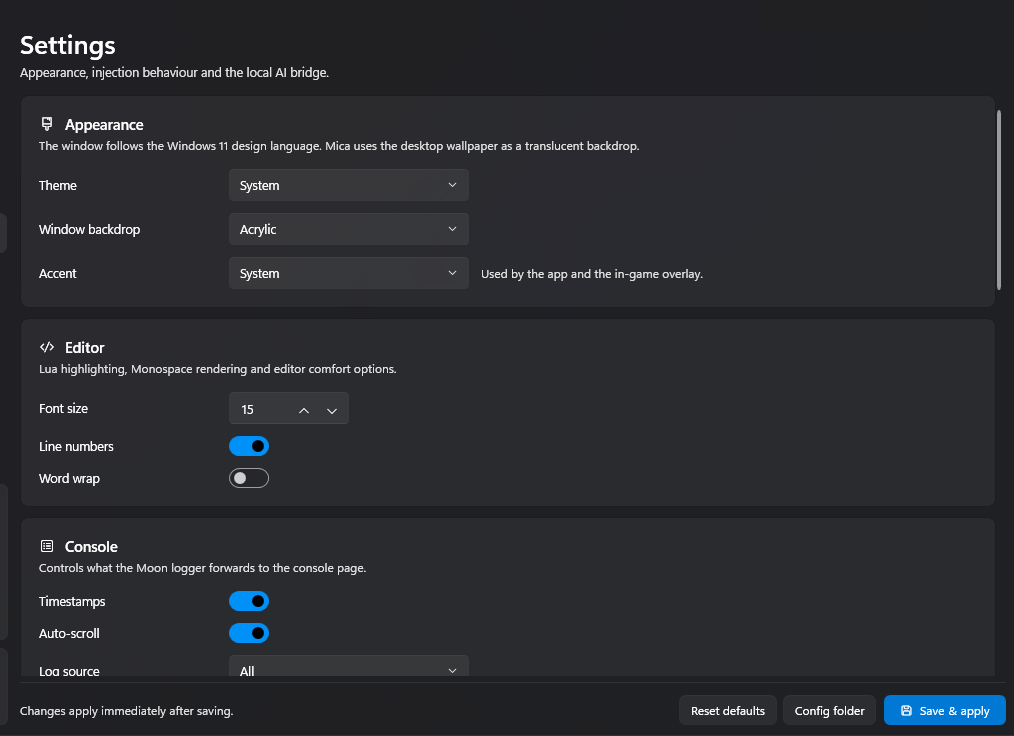
Appearance
Follow Windows or pin light/dark. Mica, Acrylic or solid. System accent or a colour of your own — shared with the in-game overlay.
Discord Rich Presence
Shows the app name, whether Roblox is attached, and how long Moon has been open. Works with the desktop app, no login, nothing else sent.
Module updates
Auto-update the Moon module on attach, toggle the attach notification and error dialogs, and choose where scripts and autoexec live.
Folders
Scripts, workspace, autoexec and the install folder — opened from the rail in one click, no file picker required.
05 Install
Two minutes,
then it keeps itself current.
-
1
Download the installer
One 7.6 MB setup exe. The app files are not inside it — setup fetches them from GitHub, so what you download stays small and always matches the build.
Moon-Executor-1.3.2-setup-win-x64.exe -
2
Run
MoonSetup.exeSetup asks the release channel for the payload zip, verifies the download before anyone writes a file, unpacks it to a temp folder and then installs. No admin rights, no bundling, no side-by-side copy of the app to keep in sync.
-
3
Install and attach
Moon lands in
%LOCALAPPDATA%\Programs\Moon Executorwith Start menu and desktop shortcuts, an HKCU uninstall entry, and launches when it is done. There is no account to create and no key to enter — the app is free and keyless for the whole public beta.
Command line
The installer takes switches like any other
MoonSetup.exe --silent --no-launch
MoonSetup.exe --silent --payload Moon-1.3.2-payload-win-x64.zip
"%LOCALAPPDATA%\Programs\Moon Executor\.uninstall\Uninstall Moon Executor.exe" --uninstall --silent --remove-settings
Add --payload to install from a zip you already have instead of downloading one. Drop --remove-settings to keep settings, scripts and workspace across a reinstall.
It updates before it starts. Every launch checks the public release channel. If a newer build exists, the app hands over to the installer, updates in place and reopens — you never run an old copy by accident.
06 Changelog
What changed.
- Rich Presence connects. The Discord IPC pipe is opened for overlapped I/O, so SET_ACTIVITY frames leave the app while the reader is waiting. The settings card reports the real state instead of a permanent “Waiting for Discord”.
- No clipped text. Combo boxes, text fields and number boxes share padding styles, so glyphs are no longer cut in half inside 30 px controls.
- A real terminal. Fixed dark surface, window strip with a live line count, monospaced output, colour-coded level tags, wrapped messages and a prompt row.
- No line limit. The buffer-size setting is gone and console history is never trimmed.
- Sessions that survive. Editor tabs, unsaved buffers and the active page come back on the next launch.
- Folder shortcuts. Scripts, workspace and autoexec open from the rail.
- Updates from GitHub. The public release channel replaces the old update path; a newer build installs itself before the app starts.
- Beta channel. The rail and title bar read
Beta - 1.3.x.
Take it for a lap.
Free and keyless for the whole public beta — no account, no key, no card.